How to Download Driving Licence Online in Gujarat in 2026: A Step-by-Step Guide
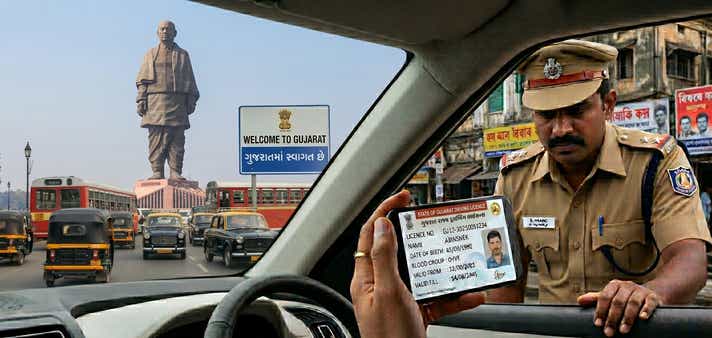
- 1Gujarat digital licences are legally valid for all traffic police checks.
- 2Access your Gujarat DL instantly via DigiLocker or the mParivahan app.
- 3Live official apps are mandatory; gallery screenshots are invalid in Gujarat.
Getting your hands on your driving credentials shouldn't require a day wasted in an RTO queue. In 2026, the Gujarat RTO operates on a highly efficient faceless service model. Because data is managed through the central Sarathi portal, any update made at a local office, whether in Ahmedabad (GJ-01) or Surat (GJ-05), instantly reflects in the national database.
Yes, a digital licence is completely legally valid under the Motor Vehicles Act, but that doesn’t mean every digital format is accepted by authorities. If you are looking to download driving licence Gujarat records, it serves as instant identity proof for domestic travel and a certified driving history for overseas employment.
Here is exactly how to access your Gujarat driving licence online using the three most secure and user-friendly portals available.
Methods for a DL Download in Gujarat
Before you begin, choose the platform that fits your immediate need. The state provides multiple secure avenues to fetch your document. Here is a quick breakdown to help you choose:
| Feature / Step | DigiLocker App | mParivahan App | Parivahan Website |
| Platform | iOS, Android, Web | iOS, Android | Web Browser |
| Login Method | Mobile Number & Security PIN | Mobile Number & OTP | OTP on Registered Mobile |
| Details Required | Aadhaar Number, DL Number | DL Number, Date of Birth | Application/DL Number, DOB |
| Account Needed | DigiLocker Account | App Registration | None (Direct Access) |
| Where to View DL | "Issued Documents" Section | App Dashboard (Virtual DL) | On-screen Dashboard |
| Download Format | App View & Save | Digital App View & QR Code | Gujarat DL download PDF |
| Best For | Quick offline access during traffic stops | Daily commuters needing a virtual backup | Recent applicants needing a physical print |
Using Your Downloaded Gujarat Driving Licence: What You Need to Know
A downloaded digital driving licence is a government-verified soft copy. Under the Information Technology Act, 2000, documents pulled via authorised apps carry the exact same legal validity as the physical smart card issued by your Gujarat RTO driving licence authority.
Where It Works:
- Traffic Police Checks: Fully accepted by Gujarat Traffic Police across all city limits, highways, and check posts.
- Identity Proof: Serves as a valid government ID for hotel check-ins or domestic flights out of Sardar Vallabhbhai Patel International Airport (Ahmedabad) or Surat Airport.
Vehicle Rentals: Rental agencies readily accept authorised digital DLs for KYC verification, whether you're renting a car for the Statue of Unity or a two-wheeler in Diu/Somnath.
Where It Fails (The Red Flags):
- Screenshots Are Invalid: A simple screenshot or gallery photo of your licence is a massive red flag during a police check. It is legally invalid; you must present the document live within the authorised app.
- Suspended Licences: If your licence is suspended for severe violations, the digital copy instantly renders invalid via the real-time e-challan database.
- International Driving: Applying for an International Driving Permit (IDP) strictly requires your physical RTO smart card.
What You Need Before You Start
To ensure a seamless DL download Gujarat experience without mid-process errors, keep these details ready:
- Application Number: Crucial if you are downloading a newly issued or renewed licence directly from the Parivahan portal.
- Driving Licence Number: Required to fetch your document. Ensure you use the exact Gujarat format with correct spacing (e.g., GJXX YYYYNNNNNNN).
- Registered Mobile Number: You must have access to the active phone number linked to your RTO profile to receive secure OTPs.
- Date of Birth: Must match the exact date on your original RTO application.
- Aadhaar Number: Required exclusively if you are using DigiLocker to pull your records.
1. Download Driving Licence in Gujarat via Parivahan Sewa
The Parivahan Sewa portal is the primary gateway for vehicle services in India. If you need a high-resolution, printable document, this is the DL download Gujarat official method.
- Access the Portal: Visit the official Parivahan Sarathi website.
- State Selection: Select "Gujarat" from the "Select State Name" dropdown to customise the dashboard for the Gujarat Commissionerate of Transport.
- Navigate to Services: Hover over the "Driving Licence" tab and click "Print Driving Licence".
- Enter Your Details - Provide your Application Number and Date of Birth. If you only have your DL number, use the "Search by DL" feature under the Informational Services tab to locate your application details first.
- Verify OTP: Enter the security code sent to your registered mobile number.
- Download PDF: Once verified, click "Print" to save the official Gujarat DL download PDF directly to your device.
Note: If your licence details aren't appearing yet, your application might still be processing. You can understand how to check your Driving Licence application status in Gujarat to see the current stage of your approval.
2. DL Download in Gujarat via DigiLocker
DigiLocker is a secure cloud platform that uses a "pull" mechanism to fetch verified data straight from Gujarat RTO servers.
- Log In: Open the DigiLocker app or website and log in using your Aadhaar number and 6-digit PIN.
- Search: Go to "Search Documents" and type "Gujarat Transport" or "Ministry of Road Transport".
- Select Authority: Choose "Driving Licence".
- Provide Credentials: Enter your full Gujarat DL number (e.g., GJ01 20260012345).
Get Document: Tick the consent box and fetch the document. It will now live in your "Issued" folder, carrying full legal weight during traffic stops.
3. mParivahan App (The Virtual DL Method)
Ideal for offline access, especially when driving through low-connectivity zones like the Rann of Kutch or Gir Forest.
- Download the mParivahan app from your app store.
- Sign up and verify your mobile number via OTP.
- Navigate to the "DL" tab on the main dashboard.
- Enter your DL number and Date of Birth.
- Click "Add to Dashboard to Activate Virtual DL".
Complete a final OTP verification. Your offline virtual licence is now ready.
The Cost of Driving Without a Licence in Gujarat
Driving without a valid licence propels you to pay Gujarat e-challan, enforced by a massive CCTV network linked to the Gandhinagar Command and Control Centre. Gujarat utilises a tiered fine system under the amended Motor Vehicles Act. Don't leave yourself open to fines; secure your digital copy today.
| State | Penalty for Driving Without Valid Licence | Additional Consequences |
| Gujarat | ₹2,000 - ₹3,000 | Potential vehicle impoundment; insurance claim denial. |
| Maharashtra | ₹5,000 | Mandatory court appearance for repeat offenders. |
| Delhi | ₹5,000 | Potential imprisonment for up to 3 months (severe cases). |
Note: Fines are based on state-specific MVA guidelines and are subject to revision during special Gujarat Traffic Police enforcement drives.
View the full Ahmedabad (Gujarat) traffic challan rules here.
Troubleshooting Common Download Issues
Digital systems are efficient, but glitches happen. Here is how to fix them without the runaround:
1. Gujarat driving licence not showing online
If your licence was issued before the RTOs were fully computerised, your data isn't in the system.
The Fix: Go to "Services on DL" on the Parivahan portal and apply for a "Backlog Entry". Upload a photo of your old licence so the RTO can digitise your record.
2. Mobile Number Update Required
Because the process is OTP-secured, an outdated mobile number is a hard stop.
The Fix: Use the "Update Mobile Number" feature on the Sarathi portal. Select Gujarat, input your licence details, and link your current active number.
3. Record Mismatches (Name/DOB)
The Fix: Apply for a "Correction in DL" via the Parivahan portal. Upload valid ID proofs to correct the errors without visiting the RTO.
4. Need a Gujarat RTO DL Extract?
Sometimes a standard copy isn't enough for strict legal or insurance audits.
The Fix: Navigate to "Services on DL" and select "DL Extract" to get a verified history of your driving career for a nominal fee of roughly ₹50.
Gujarat RTO Contact Details & Major City Codes
If you hit a technical snag, the local RTO or the state transport helpline is your best point of contact.
- State Transport Helpline: 1800 233 1122
- Parivahan National Helpdesk: 0120-4925505
Email Support: cot-trans-guj@gujarat.gov.in
Major Gujarat RTO Locations:
| RTO Code | Location | Address |
| GJ-01 | Ahmedabad (West) | Subhash Bridge, Ahmedabad - 380027 |
| GJ-02 | Mehsana | Palanpur Highway, Mehsana - 384002 |
| GJ-03 | Rajkot | Marketing Yard, Rajkot - 360003 |
| GJ-05 | Surat | Nanpura, Opp. Bahumali Building, Surat - 395001 |
| GJ-06 | Vadodara | Golden Chokdi, Harni-Waghodia Road, Vadodara - 390022 |
| GJ-18 | Gandhinagar | Sector-10, Gandhinagar - 382010 |
| GJ-27 | Ahmedabad (East) | Vastral, Ahmedabad - 382418 |
Frequently Asked Questions
Expand all