How to Download Driving Licence Online in Maharashtra in 2026: A Step-by-Step Guide
- 1Digital DLs in Maharashtra are legally equivalent to physical smart cards.
- 2Download your Maharashtra DL easily via DigiLocker or the mParivahan app.
- 3Avoid heavy fines by using official apps; simple screenshots are not valid.
- Methods to Download Your Driving Licence Online
- Using Your Downloaded Maharashtra Driving Licence: What You Need to Know
- Method 1: Download Driving Licence in Maharashtra via Parivahan Portal
- Method 2: DL Download in Maharashtra via DigiLocker
- Method 3: DL Download via the mParivahan App
- The Cost of Driving Without a Valid Licence in Maharashtra
- Maharashtra RTO Contact Details and Helpline Numbers
- Troubleshooting Common Download Issues
As India accelerates into a digital-first 2026, the days of carrying a bulging wallet filled with plastic cards are officially behind us. For commuters navigating the busy streets of Mumbai, Pune, Nagpur, and the rest of the state, the ability to download driving licence Maharashtra documents directly to a smartphone has fundamentally simplified how we manage essential paperwork.
Whether you have misplaced your original physical card or simply want a secure digital backup on your phone, accessing your Maharashtra driving licence online is now faster and more reliable than ever. Beyond sheer convenience, fetching a digital copy of your driving credentials is fully recognised under both the Information Technology Act and the latest amendments to the Motor Vehicles Act. You can present your digital licence exactly as you would a physical one.
This comprehensive guide breaks down the DL download Maharashtra official method, ensuring you stay compliant with current regulations while fully utilising the state’s digital infrastructure.
Methods to Download Your Driving Licence Online
Before jumping into the steps, it is important to know which platform fits your immediate needs. The Maharashtra Transport Department authorises three distinct digital avenues for a secure DL download Maharashtra process.
Here is a quick comparison to help you choose the right path:
| Feature | DigiLocker App | mParivahan App | Parivahan Website |
| Platform | iOS, Android, Web | iOS, Android | Web Browser |
| Login Method | Mobile number & Security PIN | Mobile number & OTP | OTP on registered mobile number |
| Details Required | Aadhaar number, DL number | DL number, Date of Birth | Application/DL number, Date of Birth |
| Account Needed | DigiLocker account | App registration | None (Direct access) |
| Where to View | "Issued Documents" section | App Dashboard (Virtual DL) | On-screen dashboard |
| Format | App View & Save | Digital App View & QR Code | Maharashtra DL download PDF |
| Best For | Quick access during traffic stops | Daily commuters needing a backup | Recent applicants wanting a printout |
Using Your Downloaded Maharashtra Driving Licence: What You Need to Know
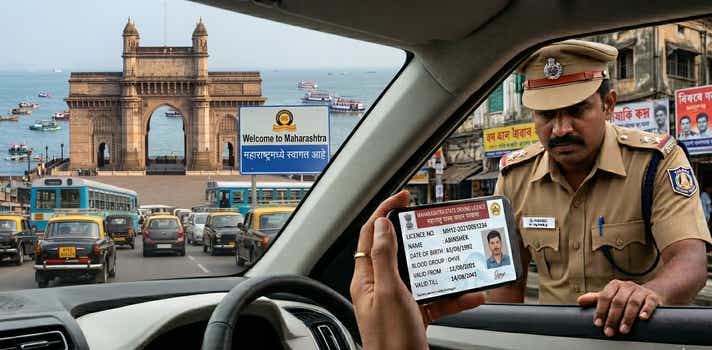
A downloaded digital driving licence is a legally binding soft copy of your driving credentials. Under the Information Technology Act, 2000, documents fetched via official government apps carry the exact same legal weight as the physical smart card issued by your Maharashtra RTO driving licence authority.
Where it is fully accepted:
- Traffic Police Checks: Presenting your digital dl via mParivahan or DigiLocker is fully accepted by the Mumbai Traffic Police, highway patrols on the Mumbai-Pune Expressway, and across all state districts.
- Identity Proof: It serves as a valid government ID for domestic flights out of CSMIA (Mumbai) or Pune Airport, as well as for hotel check-ins.
Vehicle Rentals: Local rental agencies readily accept digital DLs for KYC verification if you are booking a self-drive car in Mumbai or a two-wheeler in Lonavala.
Where it is invalid (Red Flags):
- Screenshots: A simple screenshot or gallery photo of your licence is not legally valid during a police check. You must present the live document within the authorised application.
- Suspended Licences: If the Transport Department suspends your licence for severe violations, your digital copy instantly reflects this and becomes invalid in real-time on the MahaTraffic databases.
International Driving: If you are applying for an International Driving Permit (IDP) to drive abroad, you must present the physical smart card.
Prerequisites for a Smooth Download
To guarantee a fast download without mid-process errors, gather these details before you start:
- Application Number: Essential if you are fetching a newly issued or recently renewed licence from the Parivahan portal.
- Driving Licence Number: You need the exact Maharashtra format, including the correct spacing (e.g., MHXX YYYYNNNNNNN).
- Registered Mobile Number: You must have the active phone number linked to your RTO profile to receive the verification OTP.
- Date of Birth: This must perfectly match the date submitted during your initial RTO application.
Aadhaar Number: Required exclusively if you are using DigiLocker to pull your records.
Method 1: Download Driving Licence in Maharashtra via Parivahan Portal
The Parivahan Sewa portal, managed by the Ministry of Road Transport and Highways (MoRTH), is the best choice if you need a high-quality Maharashtra DL download PDF for your records or printing.
- Go to the official Parivahan Sarathi website.
- Select Maharashtra from the "Select State Name" dropdown menu to access the state's specific dashboard.
- Click on the Driving Licence tab and select Print Driving Licence or Services on DL.
- Provide your Application Number and Date of Birth. If you only have your DL number, use the "Search by DL" feature under the Informational Services tab to locate your application details first.
- Enter the OTP sent to your linked mobile number to verify your identity.
Once verified, click the Print or Download button to save your PDF file.
Note: This portal is also where you should request a Maharashtra RTO DL Extract if you need a certified driving history for professional or legal reasons.
If your licence details aren't appearing yet, your application might still be processing. You can understand how to check your Driving Licence application status in Maharashtra to see the current stage of your approval.
Method 2: DL Download in Maharashtra via DigiLocker
DigiLocker is arguably the most popular way to manage your documents. Because Maharashtra RTO data is fully synced with this cloud platform, the document carries a digital signature and QR code that makes it instantly verifiable by any traffic officer.
- Open the DigiLocker website or mobile app and log in using your Aadhaar and security PIN.
- Navigate to the Issued Documents section and click on Get More Documents.
- Search for the Ministry of Road Transport and Highways, then select Driving Licence.
- Enter your full Maharashtra RTO driving licence number.
- Tick the consent box and click Get Document.
Your officially verified licence will now be saved in your "Issued" folder.
Method 3: DL Download via the mParivahan App
For drivers who prefer dedicated mobile apps, mParivahan creates a "Virtual DL" that is valid across India. This is especially useful for offline access when travelling through areas with spotty internet connectivity, like the Konkan coast or the Western Ghats.
- Download the mParivahan app from the iOS App Store or Google Play Store.
- Register and create an account using your mobile number.
- Open the dashboard and tap on the DL tab.
- Input your DL number and Date of Birth.
- Tap Add to Dashboard for Virtual DL.
Verify your request via OTP. Your digital licence is now stored on your phone for offline use.
The Cost of Driving Without a Valid Licence in Maharashtra
Driving without valid credentials is a serious offence. Maharashtra enforces traffic laws heavily through a centralised, cashless e-challan system backed by extensive CCTV networks in major cities. Under Section 3/181 of the Motor Vehicles (Amendment) Act, you will face severe penalties if caught without your licence.
To safeguard yourself from potential court summons, we highly recommend securing your digital copy by following this guide to download a driving licence in Maharashtra.
Fine Comparison by State:
| State | Penalty for Driving Without a Valid Licence | Additional Consequences |
| Maharashtra | ₹5,000 | Mandatory court appearance for repeat offenders; potential vehicle impoundment. |
| Gujarat | ₹2,000 (Two-wheelers)
₹3,000 (Four-wheelers) | Penalty varies by vehicle type based on state-specific leniency rules. |
| Karnataka | ₹1,000 - ₹5,000 | Fines scale from as per vehicle class |
Note: Fines are based on the latest Motor Vehicles Act and can be revised during specific enforcement drives by the Maharashtra Highway Police.
Despite following all the measures in keeping yourself away from challans, it’s always wise to periodically check Maharashtra e-challans to avoid missing any potential fines.
Maharashtra RTO Contact Details and Helpline Numbers
If you hit a roadblock during your digital download, your best course of action is to contact the specific RTO that issued your licence.
Helpdesk Contacts:
- Toll-Free Citizen Call Centre: 1800 120 8040
- Transport Commissioner Office (Mumbai): 022-22614721 / 022-22614722
Email Support: rto.01-mh@gov.in (Replace '01' with your specific RTO code)
Key Maharashtra RTO Locations:
| RTO Code | Location | Address |
| MH-01 | Mumbai (Central) | Old Bodyguard Line, Tulsiwadi, Tardeo, Mumbai - 400034 |
| MH-02 | Mumbai (West) | D-111, Ambivali Village, Versova Road, Andheri (W) - 400053 |
| MH-03 | Mumbai (East) | Wadala Truck Terminal, Wadala, Mumbai - 400037 |
| MH-04 | Thane | Near Cadbury Junction, Eastern Express Highway, Thane - 400601 |
| MH-12 | Pune | Near Sangam Bridge, Raja Bahadur Rd, Pune - 411001 |
| MH-14 | Pimpri-Chinchwad | Sector No. 6, Spine Road, Moshi, Pimpri-Chinchwad - 412105 |
| MH-15 | Nashik | Near Panchavati, Trimbak Road, Nashik - 422002 |
| MH-20 | Aurangabad | Railway Station Road, Chhatrapati Sambhaji Nagar - 431005 |
| MH-31 | Nagpur (City) | Near Giripeth, Amravati Road, Nagpur - 440001 |
| MH-43 | Navi Mumbai | Sector-19B, APMC Market, Vashi, Navi Mumbai - 400703 |
| MH-46 | Panvel | Central Facility Bldg, Steel Market, Kalamboli, Panvel - 410218 |
| MH-48 | Vasai-Virar | Chandansar, Virar East, Taluka Vasai, Dist. Palghar - 401305 |
| MH-50 | Karad | Near Vidyanagar, Karad, Dist. Satara - 415124 |
Troubleshooting Common Download Issues
Even government portals have occasional glitches. If you run into trouble, here is how to fix it:
1. Driving Licence Not Showing Online
This usually occurs if you have an older paper-based or smart card licence that hasn't been backlogged into the digital Sarathi database.
Solution: Visit your local RTO and submit a request for "Data Entry" or "Backlog." Once officials manually enter your records, your DL will appear online within 48 to 72 hours.
2. Invalid Credentials or No Record Found
Solution: Ensure you are using the correct format (MHXX YYYYNNNNNNN). Do not add extra spaces or special characters unless explicitly prompted.
3. Mobile Number Not Updated
Because all downloads require an OTP, an outdated mobile number will stop the process entirely.
Solution: Use the "Update Mobile Number" service on the Parivahan portal. You will need your Aadhaar card and DL issuance date to verify and update your number instantly.
4. Problems Obtaining a DL Extract
- Solution: If a standard download isn’t enough, go to the "Services on DL" section and apply for a detailed DL Extract. A nominal fee of approximately ₹50 applies.
Frequently Asked Questions
Expand all