How to Download Your Driving Licence Online in West Bengal in 2026: An In-Depth Guide
- 1West Bengal digital licences carry the same legal weight as physical smartcards.
- 2Download your West Bengal DL via DigiLocker or mParivahan for official access.
- 3Avoid gallery screenshots; use official apps for valid West Bengal traffic checks.
- Using Your Downloaded West Bengal Driving Licence: What You Need to Know
- Which Platform Should You Choose?
- Prerequisites: What to Keep Handy
- Method 1: Download Driving Licence in West Bengal via Parivahan Portal
- Method 2: DL Download in West Bengal via DigiLocker
- Method 3: Activating a Virtual DL via mParivahan
- The Cost of Non-Compliance: Traffic Fines
- Troubleshooting Digital Roadblocks
- West Bengal RTO Contact Directory
West Bengal is bridging its deep-rooted heritage with a rapid digital transformation. Whether you are navigating the historic lanes of North Kolkata, commuting through the industrial hubs of Asansol, or driving up the winding roads of Darjeeling, the way you manage your vehicular documentation has fundamentally changed.
In 2026, the state's transport department has shifted to a highly efficient, paperless ecosystem. Fetching a driving licence in West Bengal is no longer a bureaucratic maze; it’s a streamlined digital right.
This guide breaks down exactly how to secure your West Bengal RTO driving licence online without relying on middlemen.
Using Your Downloaded West Bengal Driving Licence: What You Need to Know
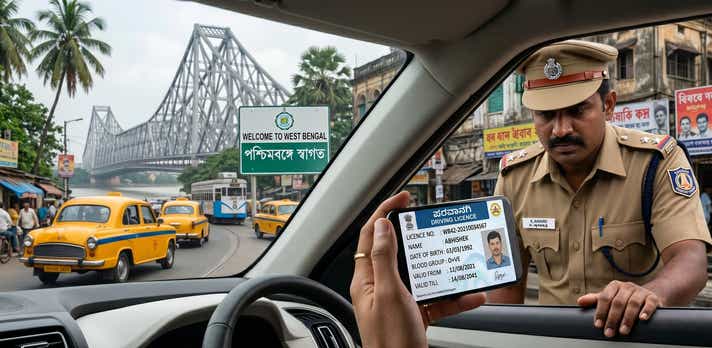
Yes, traffic authorities have the right to verify your credentials, but that doesn’t mean you are legally required to carry a physical smartcard at all times. Under the Information Technology Act, 2000, and the latest Motor Vehicles Act amendments, a digital driving licence fetched via government-authorised platforms carries the exact same legal validity as the physical card issued by your local RTO.
A clear red flag is when an official demands your physical card and refuses to look at your live digital app. If you are presenting your credentials via an official government platform, do not be afraid to politely push back and state your compliance with the 2026 digital transport guidelines.
When Digital is Valid:
- Traffic Police Checks: Fully accepted by Kolkata Traffic Police and West Bengal State Police on the Durgapur Expressway and beyond.
- Identity Proof: Valid for domestic flights out of Netaji Subhash Chandra Bose International Airport and standard hotel check-ins.
Vehicle Rentals: Widely accepted by car and bike rental agencies in tourist hubs like Darjeeling.
When Digital Fails:
- Gallery Screenshots: A screenshot or photo of your licence is legally invalid. You must open the authorised app live.
- Suspended Licences: If the RTO revokes your privileges for severe infractions, the central database updates immediately, rendering your digital copy invalid.
International Driving Permits (IDP): You must present your physical smartcard if applying for an IDP to drive abroad.
Which Platform Should You Choose?
Before diving into the steps, understand which DL download West Bengal official method suits your current situation best.
| Platform | Best Used For | Login Requirement | Final Format |
| DigiLocker App | Quick offline access during Kolkata Police checks. | Mobile number & Aadhaar | App View & Save |
| mParivahan App | Daily commuters needing a fast, scannable virtual backup. | Mobile number & OTP | In-App Dashboard & QR |
| Parivahan Website | Official paperwork requiring a West Bengal DL download PDF. | Mobile number & OTP | Downloadable/Printable PDF |
Prerequisites: What to Keep Handy
To ensure a frictionless download without mid-process timeouts, gather these details first:
- Driving Licence (DL) Number: Ensure you use the exact formatting and spacing (e.g., WBXX YYYYNNNNNNN).
- Application Number: Crucial if you are downloading a newly issued or recently renewed licence directly from the central portal.
- Registered Mobile Number: You must have the active phone connected to your RTO profile to receive the verification OTP.
- Date of Birth: This must precisely match the date submitted during your original RTO application.
- Aadhaar Number: Required only if you are using DigiLocker to pull your records.
Method 1: Download Driving Licence in West Bengal via Parivahan Portal
The Ministry of Road Transport and Highways (MoRTH) Sarathi portal is the definitive database. If you need a high-resolution, printable West Bengal DL download PDF, this is the most comprehensive route.
- Access the Portal: Visit the official Sarathi Parivahan website.
- Select Your State: Click the "Select State Name" dropdown on the homepage and choose "West Bengal." This redirects you to the state-specific dashboard.
- Navigate to DL Services: Hover over the "Driving Licence" tab and click "Print Driving Licence."
- Enter Your Details - Provide your Application Number and Date of Birth. If you only have your DL number, use the "Search by DL" feature under the Informational Services tab to locate your application details first.
- OTP Authentication: Enter the secure OTP sent to the mobile number registered with your RTO profile.
Save Your Document: Once verified, your full licence details will populate. Click "Print" or "Download" to save your official PDF.
Note: If your licence details aren't appearing yet, your application might still be processing. You can understand how to check your Driving Licence application status in West Bengal to see the current stage of your approval.
Method 2: DL Download in West Bengal via DigiLocker
DigiLocker is the most popular way for residents in Kolkata, Howrah, and Siliguri to manage their documents. Instead of just storing files, it actively pulls verified data straight from the West Bengal RTO servers.
- Log In: Open the DigiLocker application or web portal and sign in using your Aadhaar number and 6-digit security PIN.
- Search for the Issuer: Go to "Search Documents" and type "West Bengal Transport" or "Ministry of Road Transport."
- Select Document Type: Click on "Driving Licence."
- Input DL Details: Enter your full DL number exactly as it appears on your physical card.
- Fetch the Record: Tick the consent box and click "Get Document." Your digitally signed licence, complete with a scannable QR code, will now permanently reside in your "Issued Documents" folder.
Method 3: Activating a Virtual DL via mParivahan
For a dedicated, mobile-first experience, mParivahan is exceptional. It creates a "Virtual DL" that remains accessible even in areas with patchy internet connectivity.
- Install the App: Download mParivahan from the iOS App Store or Google Play Store.
- Register: Create an account using your mobile number and verify via OTP.
- Access the Dashboard: Tap the "DL" tab on the main screen.
- Enter Information: Type in your DL number and Date of Birth.
- Activate: Tap "Add to Dashboard to Activate Virtual DL."
- Final Verification: Complete one last OTP check to securely link the licence to your smartphone.
The Cost of Non-Compliance: Traffic Fines
Driving without valid documentation is a severe violation. With the state strictly enforcing the amended Motor Vehicles Act via widespread CCTV and e-challan systems, evading detection is highly unlikely.
To protect yourself from predatory fines, always keep your digital backup secure. Follow a proper download driving licence in West Bengal guide to ensure you are never caught empty-handed.
| State | Penalty for Driving Without a Valid Licence | Additional Consequences |
| West Bengal | ₹5,000 | Fines scale up to ₹10,000 for repeat offences; potential vehicle impoundment or imprisonment for severe cases. |
| Delhi | ₹5,000 | Potential vehicle impoundment; up to 3 months imprisonment for severe cases. |
| Maharashtra | ₹5,000 | Mandatory court appearances enforced for repeat offenders. |
Note: Penalties are based on the latest central guidelines and are subject to revision during specific localised enforcement drives.
Despite following all the measures in keeping yourself away from challans, it’s always wise to periodically check West Bengal traffic challans to avoid missing any potential fines.
Troubleshooting Digital Roadblocks
Even a robust West Bengal driving licence online system has its hiccups. Here is how to bypass the most common roadblocks:
1. "Record Not Found" (Licence Not Showing Online)
If you hold an older "booklet" style or paper licence issued before total state digitisation, the servers will not recognise your number.
The Fix: Log in to the Parivahan portal and apply for a "Backlog Entry." Upload a clear photo of your old physical licence. The RTO will manually verify and digitise your record, allowing you to download it securely.
2. OTP Verification Failures
Because all secure downloads are strictly OTP-driven, an outdated mobile number will completely block your access.
The Fix: Use the "Update Mobile Number" faceless service on the Sarathi portal. By authenticating with Aadhaar, you can instantly link your new number to your DL profile without visiting the RTO.
3. Mismatched Information or Incorrect Photo
If your downloaded PDF displays an old address or a spelling error.
The Fix: Apply for a "Correction in DL" via the portal. West Bengal offers "Faceless" services for minor corrections and address changes, allowing you to upload KYC proofs and receive an updated digital DL without leaving your home.
4. Obtaining a Certified Extract
If a standard digital copy isn't enough for legal verifications or international visas.
- The Fix: Navigate to "Services on DL" and choose "DL Extract." For a nominal government fee, you can download a certified, comprehensive history of your driving records.
West Bengal RTO Contact Directory
If you encounter an unresolvable data mismatch, escalating the issue to the RTO that originally issued your licence is the fastest way to get it fixed.
Central Helpdesks:
- State Transport Toll-Free: 1800 345 5192
- Public Grievance (Kolkata): 033-24751621
- National Parivahan Support: 0120-4925505
Email: wtc-wb@nic.in
Major West Bengal RTO Hubs:
| RTO Code | City / Location | Address |
| WB-01 | Kolkata (Beltala) | 38, Beltala Road, Bakul Bagan, Bhowanipore, Kolkata - 700020 |
| WB-02 | Kolkata (PVD) | 38, Beltala Road, Kolkata - 700020 (Public Vehicles Dept) |
| WB-03 | Kolkata (North) | 5, Kundu Lane, Belgachia, Kolkata - 700037 |
| WB-04 | Kolkata (South) | 2, Kasba Road, Kolkata - 700042 |
| WB-05 | Kolkata (Behala) | 2, Diamond Harbour Rd, Kolkata - 700034 |
| WB-06 | Kolkata (Salt Lake) | CF-320, Sector I, Salt Lake City, Kolkata - 700064 |
| WB-07 | Howrah | 4, M.G. Road, Howrah - 711101 |
| WB-12 | Howrah (Domjur) | Domjur, Howrah - 711405 |
| WB-16 | Hooghly (Chinsurah) | Chinsurah, Hooghly - 712101 |
| WB-20 | Nadia (Krishnanagar) | Krishnanagar, Nadia - 741101 |
| WB-26 | North 24 Parganas | Barasat, Kolkata - 700124 |
| WB-71 | Siliguri | Mainak Tourist Complex, Siliguri - 734003 |
| WB-74 | Darjeeling | Kutchery Compound, Darjeeling - 734101 |
Frequently Asked Questions
Expand all