How to Download Driving Licence Online in Karnataka in 2026: A Complete Guide
- 1Karnataka digital driving licences are legally valid for traffic police checks.
- 2Secure your Karnataka DL instantly in 2026 via DigiLocker or mParivahan.
- 3Screenshots are legally void; use live official apps for Karnataka police checks.
- Methods to Download Your Driving Licence Online
- Using Your Downloaded Karnataka Driving Licence: The Rules
- What You’ll Need Before You Start
- Method 1: DL Download Karnataka via the Parivahan Platform
- Method 2: DL Download Karnataka via DigiLocker
- Method 3: DL Download Karnataka via the mParivahan App
- Challans for Driving Without a Valid License in Karnataka
- Karnataka RTO Helpline Numbers and Contact Information
- Troubleshooting Common Download Issues
- Make the Digital Shift
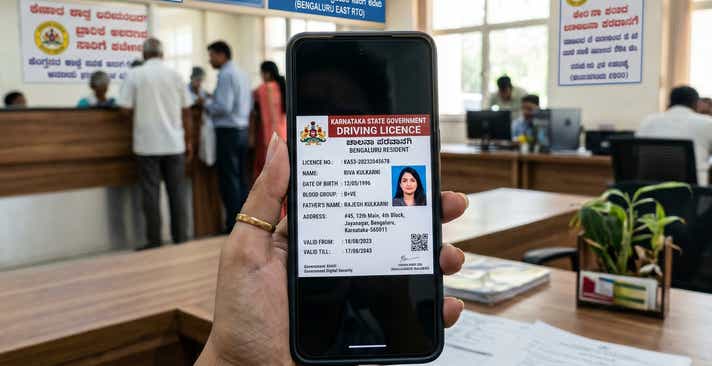
In 2026, Karnataka is further cementing its reputation as India’s tech capital by digitising nearly every citizen service. For motorists navigating Bengaluru, Mysuru, Hubballi, and beyond, the ability to download driving licence Karnataka documents instantly to a smartphone eliminates the need to deal with bureaucratic hurdles at local RTO offices.
Whether you just passed your driving test at the Koramangala RTO or simply want a secure backup on your phone, the state’s digital infrastructure makes fetching your Karnataka RTO driving licence fast and reliable. Having a digital version of your license is more than just convenient; under the Motor Vehicles Act, it is a legally accepted format for verification by traffic police.
This guide breaks down the DL download Karnataka official method, giving you the exact roadmap to stay compliant and leverage Karnataka’s digital-first services.
Methods to Download Your Driving Licence Online
Before jumping into the steps, it helps to understand which platform is the best fit for your situation. The Karnataka Transport Department authorises multiple official avenues to fetch your document securely.
Here is a quick overview to help you choose the right path instantly:
| Feature | DigiLocker App | mParivahan App | Parivahan Website |
| Platform | iOS, Android, Web | iOS, Android | Web Browser |
| Login Method | Mobile number & Security PIN | Mobile number & OTP | OTP on registered mobile number |
| Details Required | Aadhaar number, DL number | DL number, Date of Birth | Application/DL number, Date of Birth |
| Account Needed | DigiLocker account | App registration | None (Direct access) |
| Where to View | "Issued Documents" section | App Dashboard (Virtual DL) | On-screen dashboard |
| Format | App View & Save | Digital App View & QR Code | Karnataka DL download PDF |
| Best For | Quick access during Bengaluru Traffic Police checks | Daily commuters needing a virtual backup | Recent applicants wanting a printout |
Using Your Downloaded Karnataka Driving Licence: The Rules
A digital driving licence is a government-verified soft copy of your credentials. Under the Information Technology Act, 2000, documents fetched via authorised applications carry the exact same legal validity as the physical smart card issued by your local RTO.
Where You Can Use It:
- Traffic Police Checks: Presenting your digital DL via mParivahan or DigiLocker is completely valid and accepted by the Bengaluru Traffic Police (BTP) and state highway patrols across Karnataka.
- Identity Proof: It serves as a valid government ID for domestic flights out of Kempegowda International Airport (KIAL) or Mangaluru Airport, and for hotel check-ins.
Vehicle Rentals: If you are booking a self-drive car or renting a two-wheeler for a weekend in Coorg or Mysuru, local agencies will accept your digital DL for KYC verification.
Limitations and Red Flags (When It Is Not Valid):
- Screenshots Are Invalid: A red flag is assuming a photo in your gallery is enough. A screenshot of your driving licence is legally void during a police check. You must present the document live within the authorised app.
- Suspended/Revoked Licences: If the Transport Department suspends your licence for severe traffic violations, the digital copy instantly becomes invalid. Traffic officers use Personal Digital Assistants (PDAs) linked to central databases that update in real-time.
International Driving: If you are applying for an International Driving Permit (IDP) to drive abroad, you must present your physical smart card.
What You’ll Need Before You Start
To ensure a smooth, error-free download, gather these details before you begin:
- Application Number: Essential if you are downloading a newly issued or recently renewed licence via the Parivahan portal.
- Driving Licence (DL) Number: Make sure you use the exact Karnataka format with the correct spacing (e.g., KAXX YYYYNNNNNNN).
- Registered Mobile Number: You must have the active phone number linked to your RTO profile to receive the OTP.
- Date of Birth: This must perfectly match the date on your initial RTO application.
Aadhaar Number: Required exclusively if you are using DigiLocker to seamlessly pull your records.
Method 1: DL Download Karnataka via the Parivahan Platform
The Parivahan Sewa portal, managed by the Ministry of Road Transport and Highways, is the primary gateway for official requests. This platform is ideal if you need a high-quality Karnataka DL download PDF for printing, insurance claims, or legal verifications.
- Navigate to the official Parivahan Sarathi website.
- On the landing page, find the "Select State Name" dropdown and choose Karnataka. The portal will load the specific services for the state.
- Click on the Driving Licence tab and select Print Driving Licence.
- Provide your Application Number and Date of Birth. If you only have your DL number, use the "Search by DL" feature under the Informational Services tab to locate your application details first.
- Enter the OTP sent to your registered mobile number.
Once verified, your licence will appear on the screen. Click Print or Download to save the PDF to your device.
Note: If your licence details aren't appearing yet, your application might still be processing. You can understand how to check your Driving Licence application status in Karnataka to see the current stage of your approval.
Method 2: DL Download Karnataka via DigiLocker
DigiLocker is the standard for document management. Because the sync between the Karnataka Transport Department and DigiLocker is instantaneous in 2026, fetching your Karnataka driving licence online is seamless. The major benefit here is the digital signature and QR code, which authorities can scan even offline.
- Launch the DigiLocker app or website.
- Enter your Aadhaar Number and 6-digit security PIN to log in.
- Select Search Documents, then type "Ministry of Road Transport" in the search field.
- Click Driving Licence from the single access dropdown list.
- Enter your DL Number, click the consent box, and hit Get Document.
Your verified driving licence will now be saved in the "Issued" section.
Method 3: DL Download Karnataka via the mParivahan App
For the best purely mobile experience, the mParivahan app is unmatched. It creates a Virtual DL accepted state-wide. This is highly recommended for tech corridor commuters in Electronic City or Whitefield who need fast verification.
- Download the mParivahan application on your iOS or Android device.
- Sign up and verify your account with your mobile number.
- Select the DL dashboard on the home screen.
- Enter your DL number and Date of Birth.
- Tap Add to Dashboard for Virtual DL.
Complete the final OTP verification. Your digital backup is now ready for offline use.
Challans for Driving Without a Valid License in Karnataka
Driving without a valid license in Karnataka is a strict violation, propelling you to pay challan. It is heavily enforced by a massive network of ANPR (Automatic Number Plate Recognition) cameras and cashless e-challan in Karnataka.
Following recent amendments, the Karnataka government revised its penalty structure to a tiered fine system based on the vehicle type. To avoid steep financial penalties or vehicle confiscation, we highly recommend securing your credentials by following our comprehensive guide to download a driving licence in Karnataka.
Fine Comparison by State:
| State | Penalty for Driving Without a Valid Licence | Additional Consequences |
| Karnataka | ₹1,000 (Two/Three-wheelers)
₹2,000 (LMV/Four-wheelers)
₹5,000 (Heavy Vehicles) | Potential vehicle impoundment; insurance claims may be denied. |
| Maharashtra | ₹5,000 | Mandatory court appearance for repeat offenders. |
| Delhi | ₹5,000 | Potential imprisonment for up to 3 months for severe cases. |
Note: Fines are based on the latest state-specific Motor Vehicles Act guidelines and may increase during special enforcement drives.
Karnataka RTO Helpline Numbers and Contact Information
If digital systems encounter hurdles or scheduled downtime, contacting your local RTO is the best next step. Karnataka operates an extensive network of over 67 RTO offices.
Important Helpdesk Numbers:
- Karnataka Transport Department Central Helpline: 080-22353785
- National Parivahan Helpdesk: 0120-4925505 (6 AM to Midnight)
Email Support: helpdesk-sarathi@gov.in / rto-bngc-ka@nic.in
Key Karnataka RTO Addresses:
| RTO Code | Location | Address |
| KA-01 | Koramangala (BLR Central) | 21st Main Rd, Agara Village, HSR Layout, Bengaluru - 560102 |
| KA-02 | Rajajinagar (BLR West) | BBMP Complex, Rajajinagar, Bengaluru - 560010 |
| KA-03 | Indiranagar (BLR East) | BDA Complex, 2nd Floor, Indiranagar, Bengaluru - 560038 |
| KA-04 | Yeshwanthpur (BLR North) | Railway Station Road, Yeshwanthpur, Bengaluru - 560022 |
| KA-05 | Jayanagar (BLR South) | BMTC Bus Stand, 30th Cross Road, Jayanagar, Bengaluru - 560011 |
| KA-09 | Mysuru West | Vani Vilas Road, Chamarajapuram, Mysuru - 570005 |
| KA-19 | Mangaluru | Nehru Maidan, Maidan Road, Mangaluru - 575001 |
| KA-22 | Belagavi | Ramteerth Nagar, Belagavi - 590015 |
| KA-25 | Dharwad/Hubballi | Navanagar, Hubballi - 580025 |
| KA-51 | Electronic City | Vijaya Bank Layout, Devarachikkanahalli, Bengaluru - 560076 |
| KA-53 | K.R. Puram | Bhattarahalli, Old Madras Road, Bengaluru - 560049 |
Troubleshooting Common Download Issues
Even with high-end digital infrastructure, glitches occur. Here is how to fix the most common roadblocks:
1. Driving Licence Not Showing Up Online
This frequently happens to drivers with old booklet-style licences issued prior to the 2011 digitisation of RTO records.
The Fix: Apply for a "Backlog Data Entry" on the Parivahan portal. Upload a clear photo of your old licence. Once verified and digitised by the RTO, your DL will show up online.
2. Invalid Mobile Number or OTP Issues
Because the process is entirely OTP-driven, an outdated mobile number will block your download.
The Fix: Go to the "Update Mobile Number" section on the Sarathi portal. Authenticate using your Aadhaar to link your new number instantly without visiting the RTO.
3. Record Mismatch or Incorrect Photo
The Fix: If your downloaded PDF shows errors, apply for "Correction of DL" or "Replacement of DL" on the Parivahan portal. To update a photo, you may need a brief RTO appointment for fresh biometrics.
4. Difficulty Obtaining a Karnataka RTO DL Extract
The Fix: If you need a certified history of your license, navigate to "Services on DL" on Parivahan and select "DL Extract". This process requires a small fee (approx. ₹50-100) and provides a legally detailed record.
Make the Digital Shift
With the transformation of the Karnataka Transport Department's digital services, it has never been easier to secure your driving credentials. By setting up your digital DL via Parivahan, DigiLocker, or mParivahan, you ensure that your records are always up to date and readily available.
As Karnataka accelerates toward completely faceless services in 2026, keeping your mobile number updated and your documents synced is the best way to guarantee a stress-free driving experience.
Frequently Asked Questions
Expand all