How to Download Your Driving Licence Online in Rajasthan in 2026: A Step-by-Step Guide
- 1Rajasthan digital licences carry the same legal weight as physical cards.
- 2Secure your Rajasthan DL via DigiLocker or the mParivahan app in 2026.
- 3Stop using screenshots! Only official digital DLs are valid in Rajasthan.
- Using Your Downloaded Rajasthan Driving Licence: What You Need to Know
- Which Download Method is Right for You?
- What You Need Before You Start
- Method 1: Download Driving Licence in Rajasthan via Parivahan Sewa
- Method 2: DL Download in Rajasthan via DigiLocker
- Method 3: Activating a Virtual DL on mParivahan
- Challans for Driving Without a Licence in Rajasthan
- Troubleshooting Digital Roadblocks
- Rajasthan RTO Contact Details & Support
Driving across Rajasthan, from the congested urban corridors of Jaipur to the open desert highways of Jaisalmer, requires having your documentation strictly in order. But relying solely on a physical smart card is an outdated risk. By 2026, the state’s transport department will have heavily digitised its records, directly linking every Rajasthan RTO driving licence to the national Sarathi database.
This means you no longer need to depend on agents or middlemen to access your driving records. Whether you need a secure backup, a formal document for job verification, or an instant digital copy for a traffic stop, this guide breaks down exactly how to download a driving licence online in Rajasthan without the bureaucratic runaround.
Using Your Downloaded Rajasthan Driving Licence: What You Need to Know
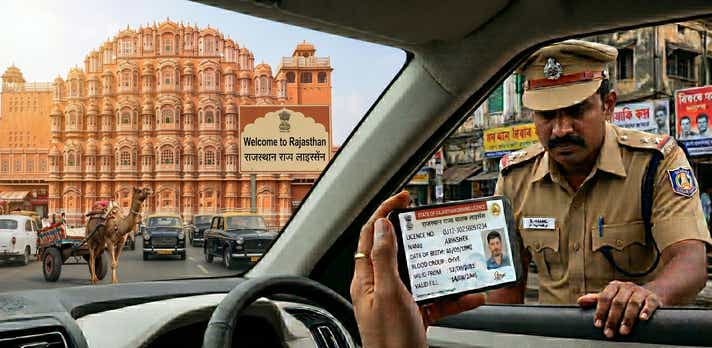
Yes, traffic authorities have the right to demand your driving credentials, but that doesn’t mean you are legally required to hand over a physical card. Under the IT Act 2000 and the latest Motor Vehicles Act amendments, a digital licence presented via official government platforms carries the exact same legal weight as your physical RTO-issued smart card.
A clear red flag is if a local authority or rental agency tries to reject your DigiLocker or mParivahan digital licence, or insists on a physical copy for routine checks.
Note on invalid formats: Screenshots or photos of your licence stored in your phone’s gallery are legally invalid. You must use the official portals.
Which Download Method is Right for You?
The transport department provides three distinct routes to manage a DL download Rajasthan. Choose the one that fits your immediate need:
| Platform | Best Used For | Login Requirement | Final Format |
| DigiLocker App | Quick offline access during police checks. | Mobile number / Aadhaar | App View & Save |
| mParivahan App | Commuters needing an instant, scannable virtual backup. | Mobile number & OTP | In-App Dashboard & QR |
| Parivahan Website | Official submissions requiring a Rajasthan DL download PDF. | Mobile number & OTP | Downloadable/Printable PDF |
What You Need Before You Start
To avoid timeout errors or mismatched data mid-process, gather these details first:
- Driving Licence Number: Ensure you have the exact spacing correct (e.g., RJXX YYYYNNNNNNN).
- Application Number: Crucial if you are downloading a newly issued or renewed licence.
- Registered Mobile Number: You must have access to the phone linked to your RTO profile to receive the verification OTP.
- Date of Birth: This must match your original RTO application exactly.
- Aadhaar Number: Required only if you are fetching the document via DigiLocker.
Method 1: Download Driving Licence in Rajasthan via Parivahan Sewa
For users needing a high-resolution Rajasthan DL download PDF for printing or formal paperwork, the Ministry of Road Transport and Highways (MoRTH) Sarathi portal is the definitive source.
- Access the Portal: Visit the official Parivahan Sewa website.
- Select Your State: From the homepage dropdown menu, select "Rajasthan" to access the state-specific transport dashboard.
- Navigate to DL Services: Click the "Driving Licence" tab, then select "Print Driving Licence."
- Enter Your Details - Provide your Application Number and Date of Birth. If you only have your DL number, use the "Search by DL" feature under the Informational Services tab to locate your application details first.
- Verify via OTP: Enter the security OTP sent to your registered mobile number.
- Save the File: Your official document will populate on the screen. Click "Download" or "Print" to secure your PDF copy.
Method 2: DL Download in Rajasthan via DigiLocker
DigiLocker doesn't just store documents; it actively pulls verified data straight from the issuing government authority.
- Log In: Open the DigiLocker app or web portal and sign in using your Aadhaar or mobile number.
- Locate the Authority: In the "Search Documents" search bar, type "Rajasthan Transport" or "Ministry of Road Transport."
- Select Document Type: Click on "Driving Licence."
- Enter DL Details: Input your exact DL number as printed on your original card.
Secure the Document: Click "Get Document." Your licence is now permanently stored in your "Issued Documents" folder, complete with a scannable QR code.
Method 3: Activating a Virtual DL on mParivahan
If you are constantly on the move, the mParivahan app creates a Virtual DL that acts as your daily driver profile.
- Install the App: Download mParivahan from the iOS App Store or Google Play Store.
- Register: Sign up using your active mobile number and complete the OTP verification.
- Access the Dashboard: Tap on the "DL" section.
- Enter Information: Type in your DL number and Date of Birth.
- Activate: Click "Add to Dashboard to Activate Virtual DL."
Final Verification: Complete one last OTP check to lock the document to your mobile device securely.
Challans for Driving Without a Licence in Rajasthan
Rajasthan has ramped up enforcement using CCTV and Automatic Number Plate Recognition (ANPR) systems. Driving without a valid licence is a severe violation under Section 3/181 of the Motor Vehicles (Amendment) Act.
To not pay Rajasthan e-challan fines, ensure you always have your digital backup ready by following a proper download driving licence in Rajasthan guide.
| State | Penalty for Driving Without a Valid Licence | Additional Consequences |
| Rajasthan | ₹5,000 | Potential vehicle impoundment; accident insurance claims risk rejection. |
| Gujarat | ₹2,000 (Two-wheelers) - ₹3,000 (Four-wheelers) | Specific state leniency rules apply based on vehicle class. |
| Delhi | ₹5,000 | Severe or repeat offenders face potential imprisonment for up to 3 months. |
Note: Fines are subject to change based on localised enforcement drives.
Troubleshooting Digital Roadblocks
Even digitised systems have flaws. Here is how to navigate the most common roadblocks:
1. "Record Not Found" / Licence Not Showing Online
If you hold an older, handwritten, or booklet-style licence from before the digital transition, the system won't recognise you.
The Fix: You must log onto the Parivahan portal and apply for a "Backlog Entry." Upload a scan of your physical licence so the RTO can manually digitise your record.
2. OTP Verification Failures
If you no longer use the phone number attached to your RTO profile, you cannot download your DL securely.
The Fix: Use the "Update Mobile Number" feature on the Sarathi portal under the Rajasthan section. You can authenticate and link your new Aadhaar-linked mobile number instantly without visiting the RTO.
3. Mismatched Information
If your downloaded PDF shows an old address or a typo.
The Fix: Use the portal's "Faceless" services to apply for a "Correction in DL." Upload your valid KYC proofs (like Aadhaar) to get the digital record amended.
4. Obtaining a Certified Extract
If you need a deep-dive history of your licence for a visa or international permit.
- The Fix: Select "DL Extract" under the "Services on DL" tab. Pay the nominal government fee (around ₹50) to download this legally certified document.
Rajasthan RTO Contact Details & Support
If you hit a wall, escalating the issue to the specific RTO where your licence was issued is the fastest route to a resolution.
Central Helpdesks:
- Transport Dept. Helpline: 0141-2740042 / 0141-2740455
- Citizen Support (Toll-Free): 1800-2000-103
Sarathi National Support: helpdesk-sarathi@gov.in
Major Rajasthan RTO Hubs:
| RTO Code | City / Location | Address |
| RJ-01 | Ajmer | Near Vaishali Nagar, Ajmer - 305001 |
| RJ-02 | Alwar | Near Matsya Industrial Area, Alwar - 301001 |
| RJ-03 | Banswara | Housing Board Colony, Banswara - 327001 |
| RJ-05 | Bharatpur | Near Collectorate, Bharatpur - 321001 |
| RJ-06 | Bhilwara | Near Patel Nagar, Bhilwara - 311001 |
| RJ-07 | Bikaner | Near JNV Colony, Bikaner - 334001 |
| RJ-14 | Jaipur (South) | Parivahan Bhawan, Sahkar Marg, Jaipur - 302005 |
| RJ-19 | Jodhpur | Near Jhalamand Circle, Jodhpur - 342005 |
| RJ-20 | Kota | Near DCM Road, Kota - 324004 |
| RJ-23 | Sikar | Near Kalyan Circle, Sikar - 332001 |
| RJ-27 | Udaipur | Near Sukhadia Circle, Udaipur - 313001 |
| RJ-45 | Jaipur (North) | Jhalana Institutional Area, Jaipur - 302004 |
Frequently Asked Questions
Expand all