How to Download Driving Licence Online in Delhi in 2026: A Step-by-Step Guide
- 1Digital DLs in Maharashtra are legally equivalent to physical smart cards
- 2Download your Maharashtra DL easily via DigiLocker or the mParivahan app
- 3Avoid heavy fines by using official apps; simple screenshots are not valid
- Methods to Download Driving Licence in Delhi Online
- Using Your Downloaded Delhi Driving Licence: What You Need to Know
- What You Will Need Before You Start
- Method 1: Download Driving Licence in Delhi via Parivahan Sewa
- Method 2: DL Download in Delhi via DigiLocker
- Steps to Fetch Your DL on DigiLocker
- Method 3: Download DL in Delhi via the mParivahan App
- Challan for Driving Without a Valid License in Delhi
- Delhi RTO Contact Details and Helpline Numbers
- Troubleshooting Common Issues While Downloading DL in Delhi
- Downloading Driving Licence in Delhi: Final Thoughts
Driving in the national capital means more than just navigating Ring Road or threading through the narrow lanes of Old Delhi; it means carrying the right documentation at all times. In 2026, the Delhi Transport Department has fully embraced the Faceless Services framework, making it easier than ever for residents to manage their vehicle-related documents from home. Whether you are a daily commuter or a weekend driver, knowing how to download a driving licence in Delhi is something every licence holder in the city needs to understand.
The long queues at Mall Road and Janakpuri RTOs are now a thing of the past. Digitalisation has made the Delhi driving licence online process as simple as a few taps on your phone. A soft copy of your DL does more than just free up space in your wallet; it gives you instant access to your credentials whenever and wherever you need them. This guide walks you through every official method, every potential issue, and everything else you need to know about DL download in Delhi.
Methods to Download Driving Licence in Delhi Online
Before you begin, it helps to pick the right platform for your situation. The Delhi Transport Department gives you three official avenues, and each one works slightly differently. Use the comparison below to decide which DL download Delhi official method works best for you.
| Feature / Step | DigiLocker App | UMANG App | Parivahan Website |
| Platform | iOS, Android, Web | iOS, Android, Web | Web Browser |
| Login Method | Mobile number & Security PIN | Mobile number & MPIN | OTP on registered mobile number |
| Details Required | Aadhaar number, DL number | DL number, Date of Birth | Application/DL number, Date of Birth |
| Account Needed | DigiLocker account | UMANG account | None (Direct access) |
| Where to View DL | "Issued Documents" section | "My Documents" → Driving Licence | On-screen dashboard after submission |
| Download Format | App View & Save | PDF (Download option available) | PDF (Save or Print) |
| Best For | Quick offline access during traffic checks | Unified access to multiple government services | Recent applicants wanting to print a physical copy |
Using Your Downloaded Delhi Driving Licence: What You Need to Know
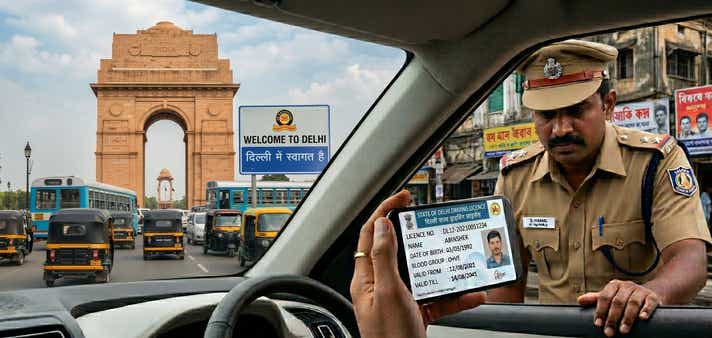
A downloaded digital driving licence is an official soft copy of your driving credentials. Under the Information Technology Act, 2000, any digital document fetched through an authorised government platform, such as DigiLocker or mParivahan, carries the same legal weight as your physical RTO-issued smartcard.
Where You Can Use It
Traffic Police Checks: Showing your DL through the mParivahan or DigiLocker app is fully accepted by the Delhi Traffic Police during roadside verification.
Identity Proof: Your digital DL serves as a valid photo ID at airports, hotels, and government offices across India.
Vehicle Rentals: Most self-drive car and bike rental platforms in Delhi accept a digital DL for booking verification.
When It Is Not Valid
Screenshots Are Invalid: A screenshot or gallery photo of your DL on your phone is not legally recognised during a police check. It must be presented live within the official app or as a digitally signed PDF.
Suspended or Revoked Licences: If the Delhi RTO driving licence database reflects a suspension or cancellation, the digital copy becomes invalid immediately. App databases update in real time.
International Driving: Applying for an International Driving Permit (IDP) still requires your physical RTO smartcard.
What You Will Need Before You Start
Keep the following details handy before attempting any DL download Delhi method to avoid mid-process delays:
Application Number: Essential if you are downloading a newly issued or recently renewed Delhi driving licence online via the Parivahan portal.
DL Number: Required for mobile app-based downloads. Know the exact format: DLXX YYYYNNNNNNN.
Registered Mobile Number: You must have the active phone number linked to your RTO profile to receive the OTP for verification.
Date of Birth: Must match the exact date recorded during your original RTO application.
Aadhaar Number: Required only if you choose to fetch your DL through the DigiLocker platform.
Method 1: Download Driving Licence in Delhi via Parivahan Sewa
The Parivahan Sewa portal is the backbone of road transport services across India. For those who need a formal, printable record, this is the most comprehensive DL download Delhi official method available. It produces a high-resolution Delhi DL download PDF that is ideal for keeping in your vehicle or submitting to institutions that require a physical copy.
Steps to Download Driving Licence via Parivahan Sewa
Step 1: Access the Portal - Visit the official Parivahan Sarathi website at sarathi.parivahan.gov.in.
Step 2: Select Your State - Click on the "Select State Name" dropdown and choose Delhi from the alphabetical list. You will be redirected to the Delhi-specific dashboard.
Step 3: Choose the Service - Navigate to the Driving Licence menu and select "Print Driving Licence".
Step 4: Enter Your Details - Provide your Application Number and Date of Birth. If you only have your DL number, use the "Search by DL" feature under the Informational Services tab to locate your application details first.
Step 5: Submit and Verify - Click Submit. An OTP will be sent to the mobile number registered against your Delhi RTO driving licence.
Step 6: Download the PDF - Once you enter the OTP, your licence details will be displayed on screen. Click "Print" to save your Delhi DL download PDF.
This method is especially handy if you need a printed copy to keep in your glove box as a physical backup.
Note: If your licence details aren't appearing yet, your application might still be processing. You can understand how to check your Driving Licence application status in Delhi to see the current stage of your approval.
Method 2: DL Download in Delhi via DigiLocker
DigiLocker is one of the most reliable platforms for Delhi driving licence online access. It is a secure, cloud-based document wallet where your Delhi RTO driving licence is automatically fetched and stored as a digitally signed document. Because the DL is issued directly by the government authority and stored locally, it is particularly trusted during traffic checks and official verifications.
Steps to Fetch Your DL on DigiLocker
Step 1: Log In - Sign in to your DigiLocker account via the website or the app using your Aadhaar number and 6-digit security PIN.
Step 2: Search for Issuers - Go to the "Search Documents" section and type "Delhi Transport". Alternatively, search for the "Ministry of Road Transport and Highways".
Step 3: Select the Document Type - Click on "Driving Licence" from the list of available document types.
Step 4: Input Your DL Number - Enter your full DL number in the correct format. Make sure there are no spacing errors.
Step 5: Fetch the Document - Tick the consent checkbox and click "Get Document". Your licence will be fetched directly from the Delhi RTO database and permanently stored in your "Issued Documents" folder.
One of the standout advantages of DigiLocker for DL download Delhi is offline usability. Traffic police officers in Delhi can verify your DL by scanning the QR code on your screen : even without an active internet connection on their end.
Method 3: Download DL in Delhi via the mParivahan App
The mParivahan app is a government-developed mobile application designed for quick, on-the-go document access. It is especially popular among daily commuters and younger drivers in Delhi for its clean, straightforward interface. If you ever find your Delhi driving licence not showing online on the main Parivahan website, mParivahan often resolves this faster through its direct search functionality.
Steps to Create a Virtual DL on mParivahan
Step 1: Download and install the mParivahan app from the Google Play Store or Apple App Store.
Step 2: Sign up using your mobile number.
Step 3: On the home screen, tap the "DL" tab.
Step 4: Enter your DL number and your Date of Birth.
Step 5: Tap "Add to Dashboard".
Step 6: A virtual version of your Delhi RTO driving licence will appear on your dashboard. This is stored on your device and is valid for all verification purposes within India.
Challan for Driving Without a Valid License in Delhi
Driving without a valid licence in Delhi is a serious offence, propelling you to pay Delhi e-challan, as getting caught is increasingly hard to avoid. In 2026, the Delhi Traffic Police has deployed an AI-powered Integrated Traffic Management System (ITMS) with Automatic Number Plate Recognition (ANPR) cameras across the city. According to official Delhi Traffic Police data, nearly 38,000 challans were issued for this offence in a single month in 2025 alone.
If you are caught without valid credentials, you face a penalty under Section 3/181 of the Motor Vehicles (Amendment) Act, 2019. The simplest way to avoid this entirely is to keep your digital DL handy, which is exactly what this guide is for.
Here is how Delhi's challan compares with two other major states:
| State | Penalty for Driving Without a Valid Licence | Additional Consequences |
| Delhi | ₹5,000 | Potential vehicle impoundment; up to 3 months imprisonment for severe or repeat cases. |
| Haryana | ₹5,000 | Rejection of third-party insurance claims in the event of an accident. |
| Maharashtra | ₹5,000 | Mandatory court appearance for repeat offenders. |
Note: Fines may vary based on regional enforcement drives, but the base penalty set by the national Motor Vehicles Act is consistent across states.
Delhi RTO Contact Details and Helpline Numbers
Delhi is divided into several transport zones, each managed by a dedicated Zonal Office or RTO. Knowing your local RTO is important if you need to resolve issues that cannot be handled through the DL download Delhi online process alone.
Key Helpline Numbers
• Delhi Transport Helpline: 1076 (Standard helpline for all faceless services)
• Transport Department Head Office: 011-23994223
• Technical Support (Sarathi): helpdesk-sarathi@gov.in
Delhi RTO Codes and Addresses
| RTO Code | Zonal Office | Address |
| DL-01 | North Delhi | Deputy Director's Zonal Office, Mall Road, Delhi - 110009 |
| DL-02 | New Delhi | Tilak Marg / IP Estate, New Delhi - 110002 |
| DL-03 | South Delhi | DDA Market, Sheikh Sarai, South Delhi, Delhi - 110017 |
| DL-04 | West Delhi-I | Community Centre, B-Block, Janakpuri, West Delhi - 110058 |
| DL-05 | North-East Delhi | Loni Road, Shahdara, Delhi - 110032 |
| DL-06 | Central Delhi | Sarai Kale Khan, New Delhi - 110013 |
| DL-07 | East Delhi-I | DTC Depot, Mayur Vihar Phase-I, Delhi - 110091 |
| DL-08 | North-West Delhi-I | DTC Depot, Wazirpur, Delhi - 110035 |
| DL-09 | South-West Delhi-I | DTC Depot, Sector-10, Dwarka, New Delhi - 110075 |
| DL-10 | West Delhi-II | DTC Depot, Raja Garden, New Delhi - 110027 |
| DL-11 | North-West Delhi-II | DTC Depot, Rohini, Delhi - 110085 |
| DL-12 | South-West Delhi-II | DTC Depot, Vasant Vihar, New Delhi - 110057 |
| DL-13 | East Delhi-II | CBD Ground, Surajmal Vihar, Delhi - 110092 |
Troubleshooting Common Issues While Downloading DL in Delhi
The faceless system is efficient, but occasional hurdles do come up. Here is how to handle the most common ones:
1. Delhi Driving Licence Not Showing Online
This is a frequent issue for those holding older, book-style licences. These records were often not automatically transferred into the digital database.
Fix: Apply for a "Backlog of DL" on the Parivahan portal. You will need to upload a scanned copy of your old licence. Once the RTO verifies and updates the record, you will be able to complete your Delhi DL download PDF without any issues.
2. Mobile Number Mismatch
The download process is entirely OTP-based. If your current mobile number is not linked to your DL profile, you will not be able to receive the verification code.
Fix: Go to the "Mobile Number Update" section on the Sarathi website. Select Delhi, enter your licence details, and link your Aadhaar-verified mobile number. Updates are usually reflected instantly.
3. No Record Found
Double-check the format of your DL number. For Delhi, the standard format is DLXX YYYYNNNNNNN, ensure there is a space after the RTO code and year if the form requires it. If you are still struggling with how to download a driving licence in Delhi 2026, try entering your Application Number instead of the DL number for a more direct search.
4. Delhi RTO DL Extract Requirement
In certain legal or formal situations, a standard DL copy may not be sufficient. A Delhi RTO DL Extract provides a certified, comprehensive history of your driving licence, including all renewals and endorsements.
Fix: Apply for the "DL Extract" service online through the Parivahan portal. This document carries significantly more weight in judicial proceedings or for international use cases compared to a regular digital copy.
Downloading Driving Licence in Delhi: Final Thoughts
Delhi's transport infrastructure has come a long way, and the ability to download a driving licence in Delhi through official digital platforms is one of its most practical outcomes. Whether you prefer the Parivahan Sewa portal for a printable PDF, DigiLocker for a permanently stored and signed document, or the mParivahan app for quick on-road access: all three are legally valid, official, and free to use.
What ties everything together is one simple habit: keep your mobile number updated with the Delhi RTO. Without a linked number, none of these DL downloads Delhi official methods will work smoothly. Take five minutes today to verify your registration, and you will never have to worry about being caught without your licence again.
Frequently Asked Questions
Expand all