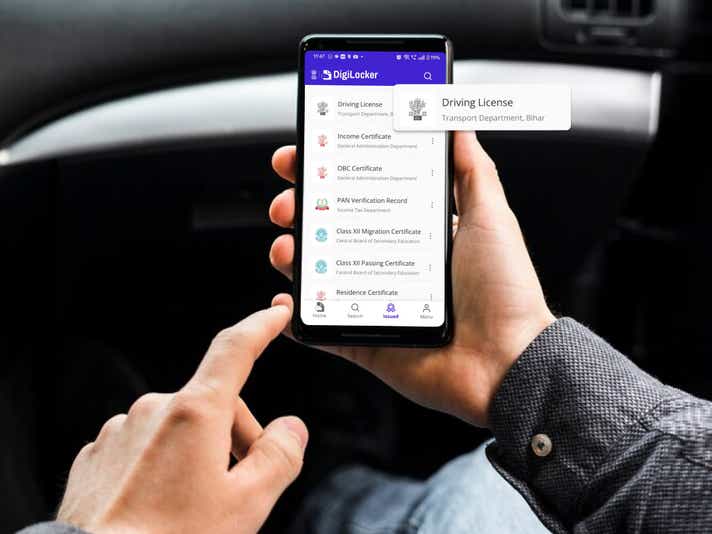
In the age of technology, knowing how to download your driving licence is important knowledge, enabling you to tackle traffic stops without being fined if you’ve lost your original copy, or are have made the error of not carrying It while driving. You can easily download a digital copy of your driving licence in just a few minutes, either through DigiLocker , or through UMANG, through this guide.
While the smart card driving licence is used universally across India, a digital, electronically downloaded copy of your licence is also valid.
It's also wise to periodically check e-challan status on your driving license, as failure to clear any pending challans may result in its suspension.
In this guide, we’ll show you step-by-step how to complete your driving licence download process using your phone number or PC.
What is an e-Driving Licence?
An e-driving licence is a regular DL but in an electronic format. It is important to understand that an electronic driving licence is not a direct substitute of its physical copy. In fact, when you are issued a driving licence from the RTO (Regional Transport Office), it is issued in a physical format. To supplement the smart card DL, you can download an electronic copy as well from DigiLocker, UMANG or the Parivahan website. The electronic copy in itself is a valid driving licence and can be used in an individual capacity.
How to Download a Driving Licence
There are multiple ways to download your driving licence online with your mobile number. To save you time, we’ve listed the most convenient methods below.
1) Download Driving Licence Through the DigiLocker
The DigiLocker application is available for both iOS and Android platforms, and is by far the easiest method for downloading your driving licence. Before starting, make sure you’re registered on the DigiLocker app.
Step 1: Tap on the “Search” icon at the bottom of the application.
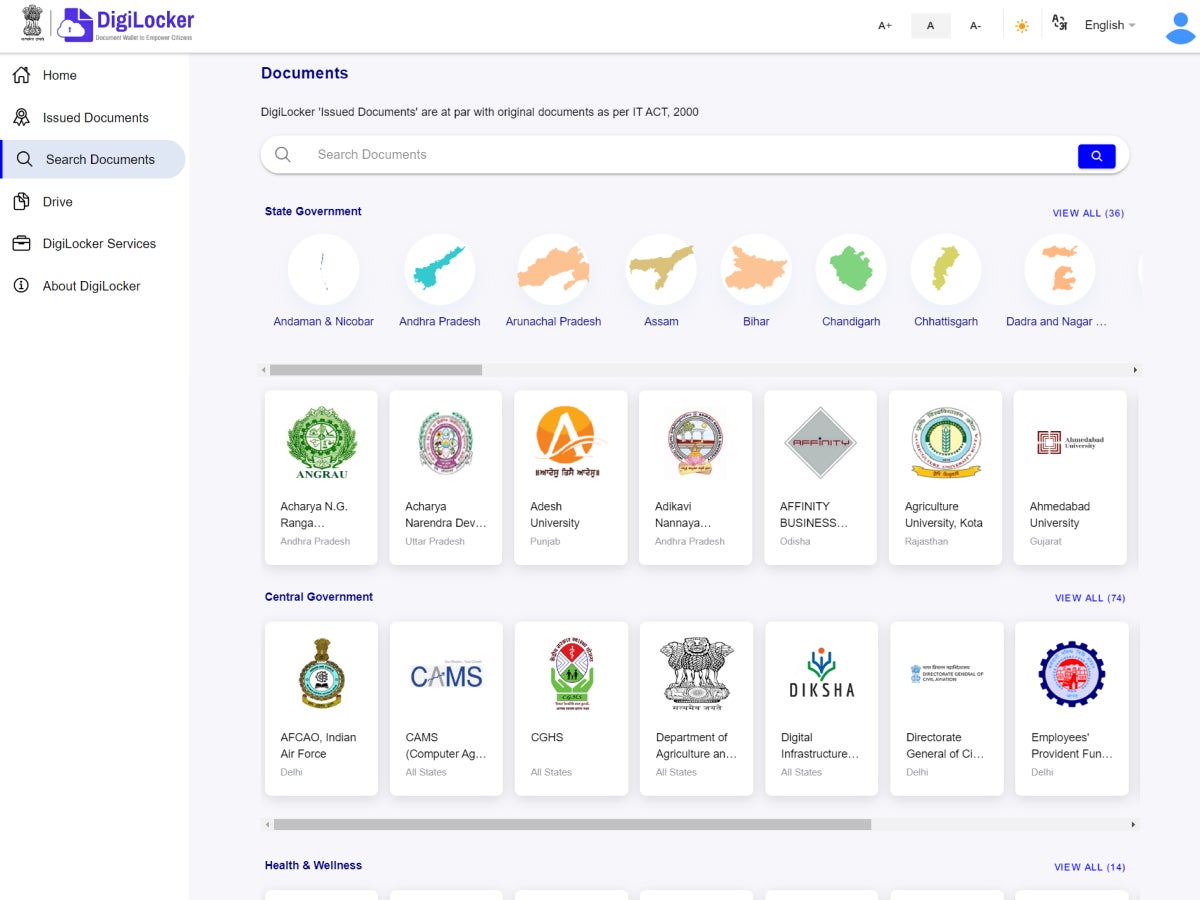
Step 2: Search for “driving licence”. It will show up under the subhead “Ministry of Road, Transport and Highway”s. Tap on it.
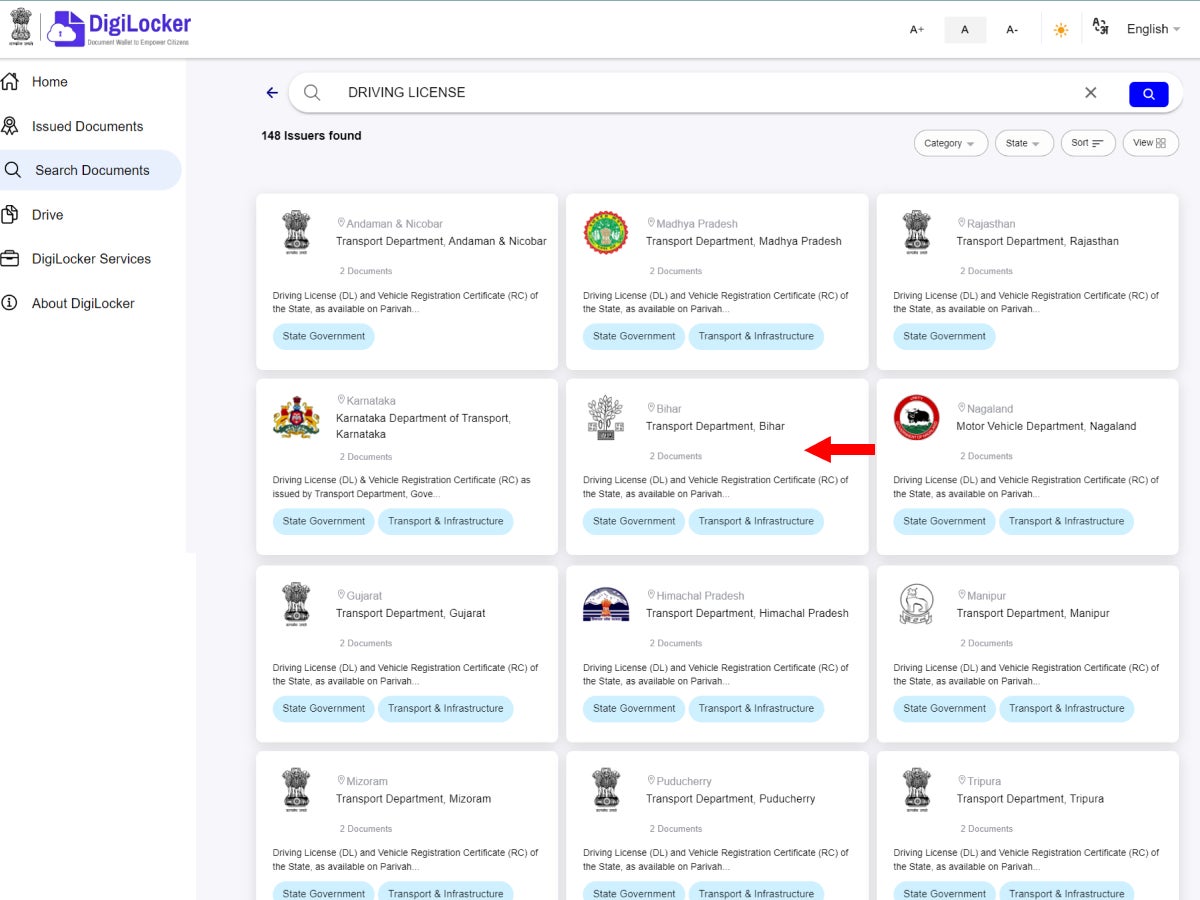
Step 3: A new screen will open with your name and date of birth already filled in according to your Aadhar Card. Below that, fill in your driving licence number in the indicated space.
Step 4: Check the consent box and then tap on “Get Document”.
Step 5: You will be redirected to the Issued Documents section of the application, and soon, your driving licence will appear there.
Step 6: Click the three dots next to your driving licence and you will see an option to “View PDF”. Tap on it.
Step 7: Your driving licence will open in a PDF format, and you can save this file on your smartphone.
These simple steps can enable you to quickly download your driving licence and store it securely for use whenever required.
2) Driving Licence Download Through the UMANG App
The UMANG application is a central online repository of all e-Gov portals, making it easier for users to access multiple government services, including downloading driving licence, in one go. The app is available for both iOS and Android platforms. Before starting, make sure to download the application and register for it using your mobile number.
Step 1: Search for “driving licence” in the search bar at the top of the screen. In the results, you will have two options. The first will be “driving licence (MoRTH)”. This will work for everyone. You can also search for your state’s name preceded by the words driving licence. Both options will open up a new page, which will be the same.
Step 2: The new screen will have a single text box option where you will need to input your driving licence number. Once that is done, check the consent box and tap on “Get Document”. For this to work, you should already have a DigiLocker account. If not, you can make one from inside the UMANG application.
Step 3: Once the document is fetched, it will be available under the “My Documents” section on the Homepage of the application. It can also be found on the “Documents” page.
Step 4: To view your DL, simply tap on “Driving Licence”. It will open up your DL on a new screen.
Step 5: To download it in PDF format, simply tap on the “Download PDF” option at the bottom of the screen.
By following these simple steps, you can quickly download your driving licence on your Adnroid or iOS device, storing it securely, ready to be presented to authorities whenever required.
3) Download a digital driving licence copy through the Parivahan Website
For those of you used to the Parivahan website, it too can be used for downloading your driving licence. However, we recommend this method mainly for those who have recently applied for a DL, as you’ll need an application number to download the soft copy.
Step 1: Go to the Parivahan website and click on “Drivers/Learners Licence”.
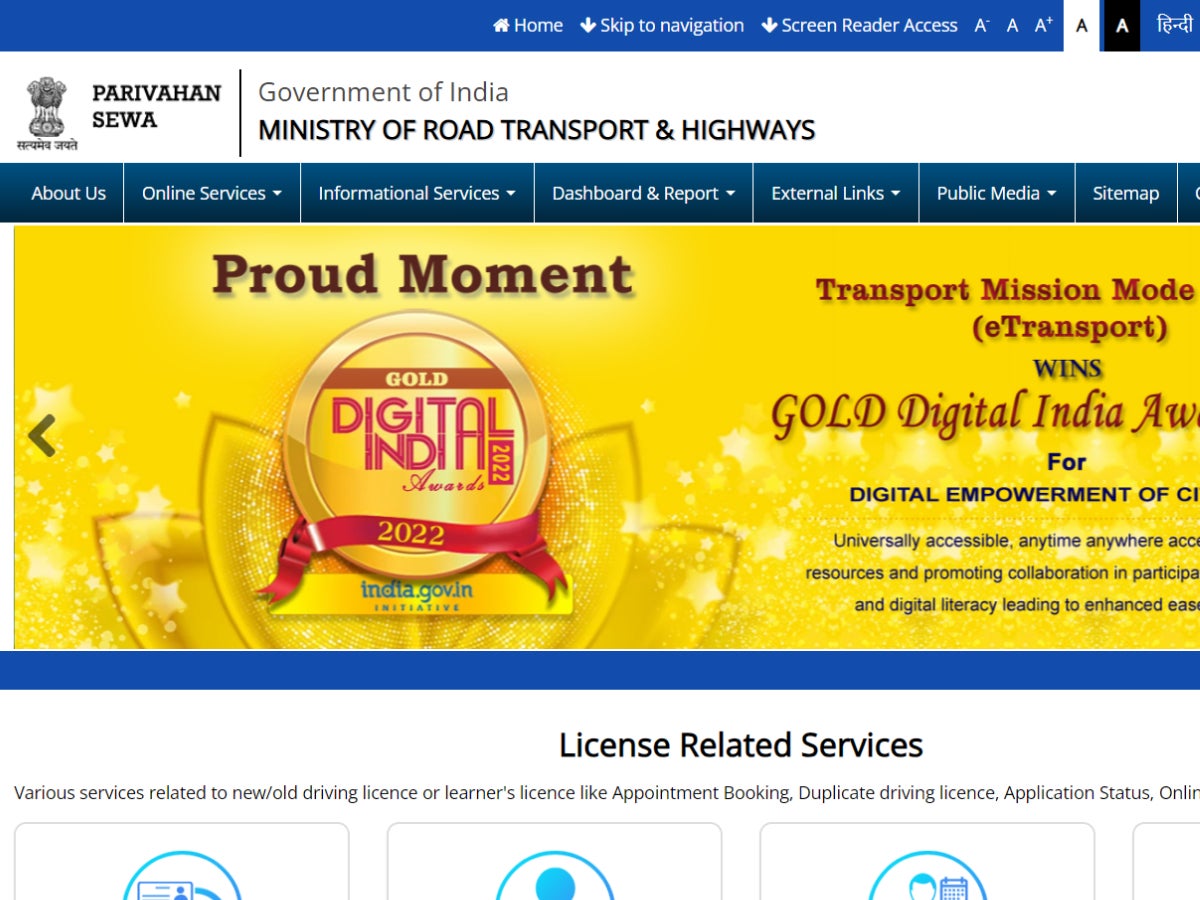
Step 2: On the new page, select your State from the drop-down list, and you will be redirected to a new page.
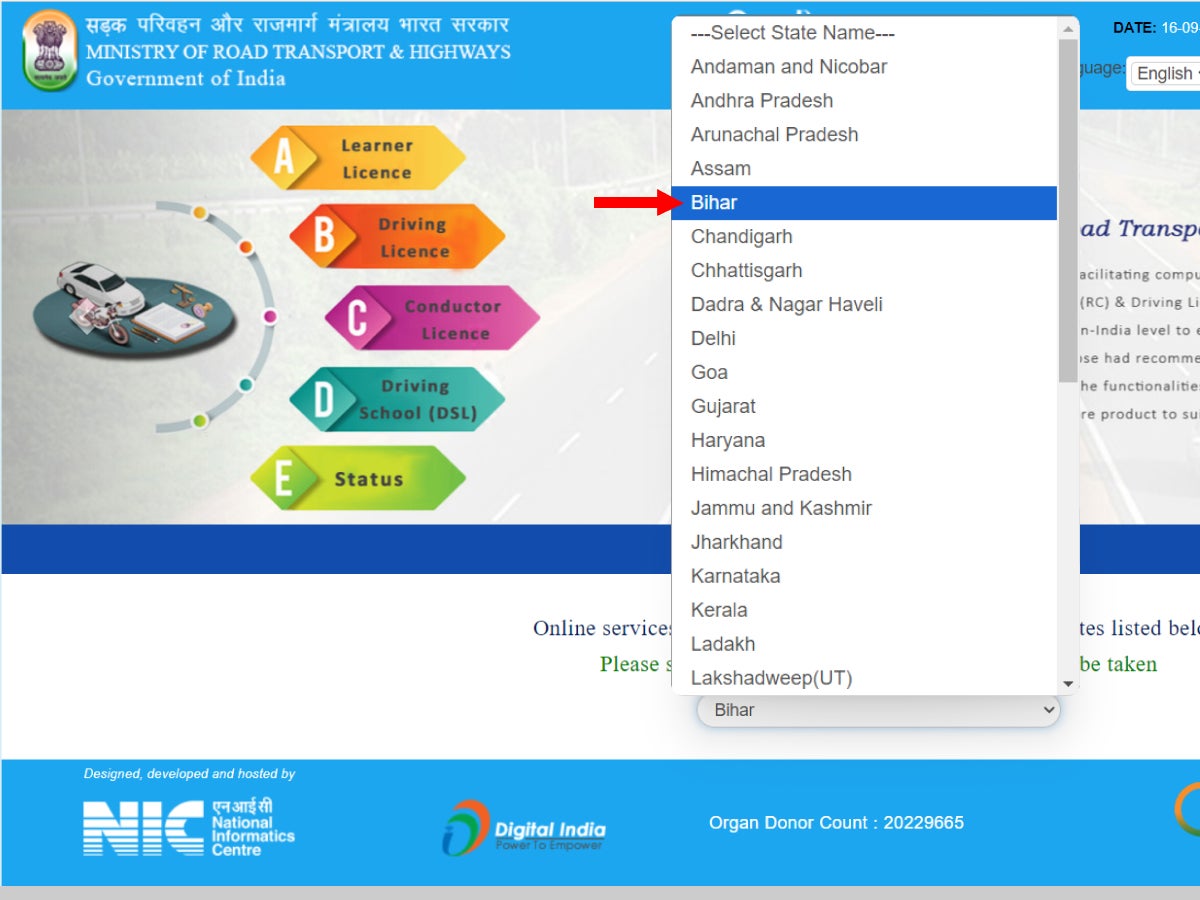
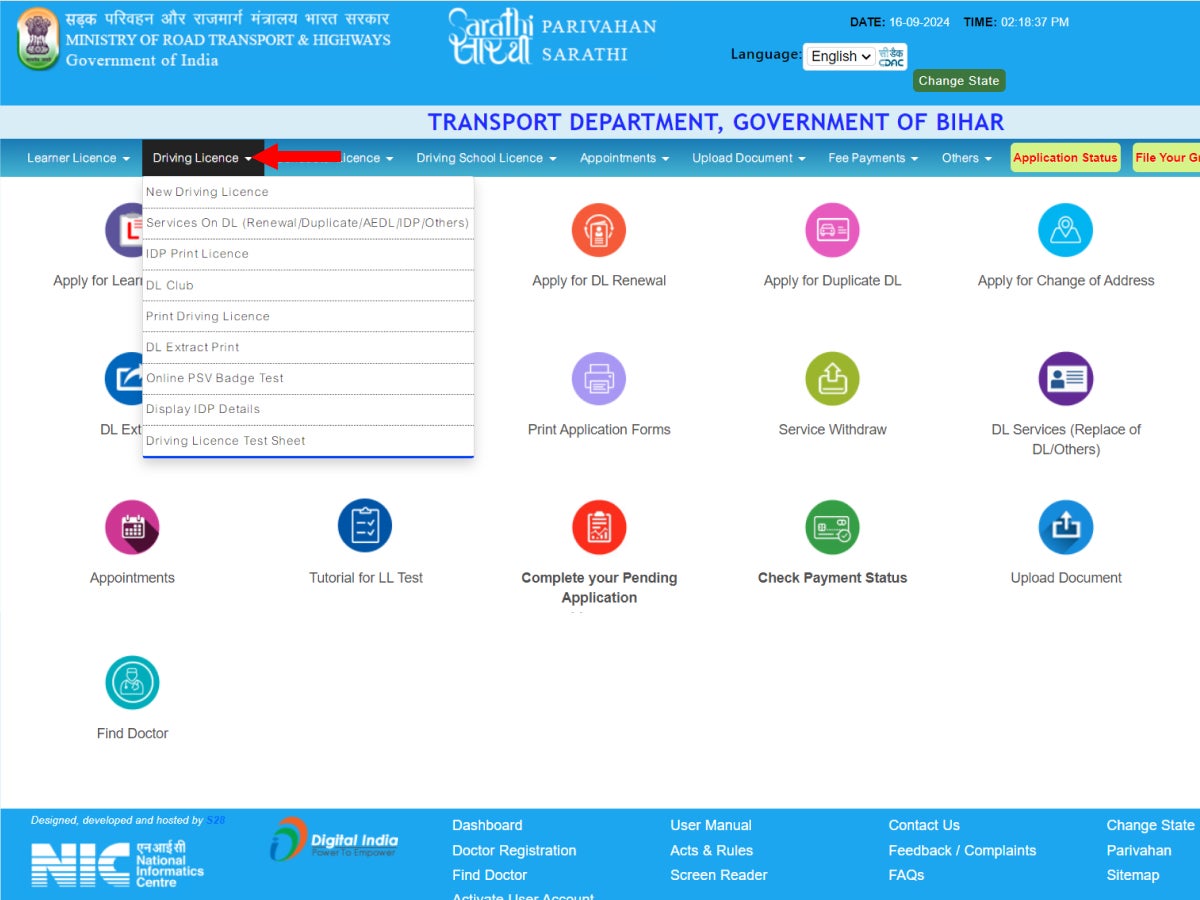
Step 3: In the menu bar at the top, hover your cursor over the second option which reads “Driving Licence”. A drop down list will appear.
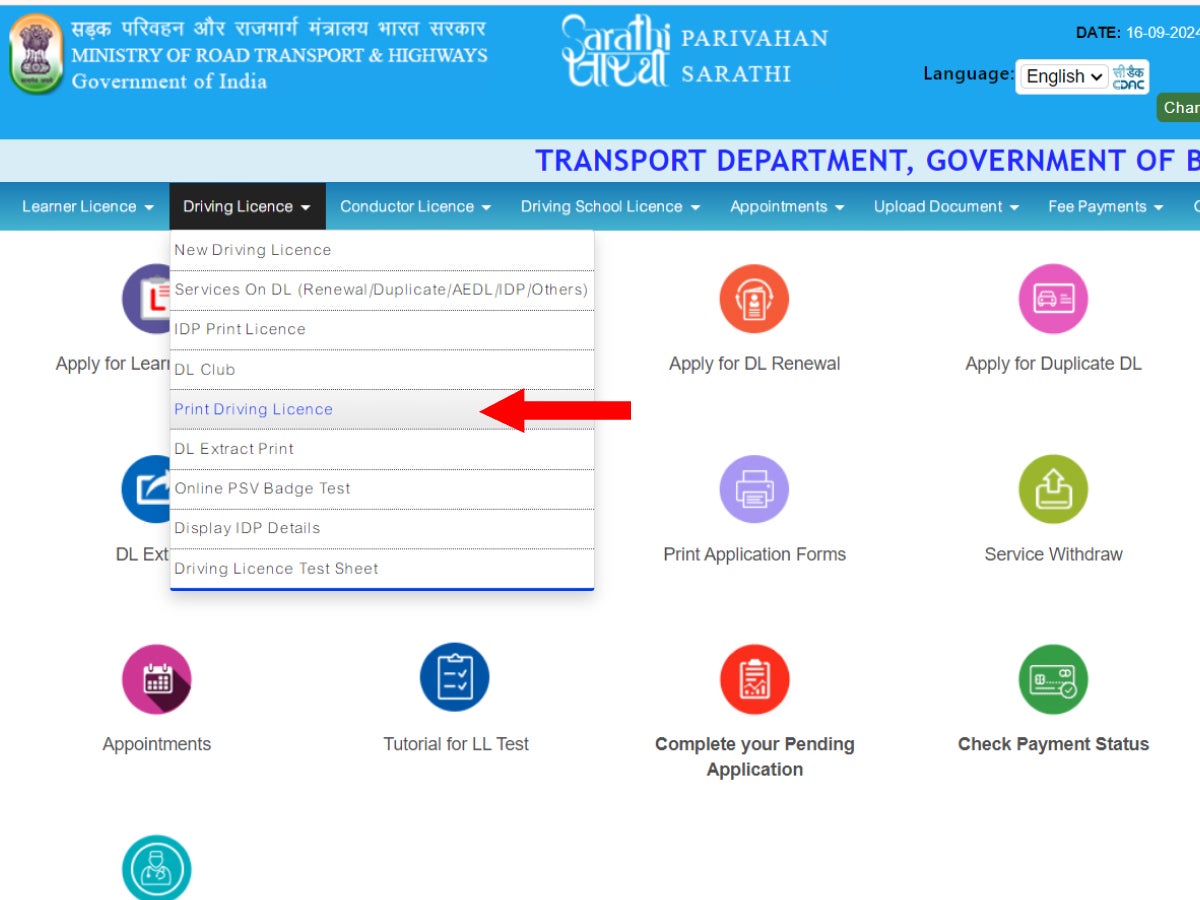
Step 4: Click on the fifth option in the list which will read “Print Driving Licence”. A new page will open.
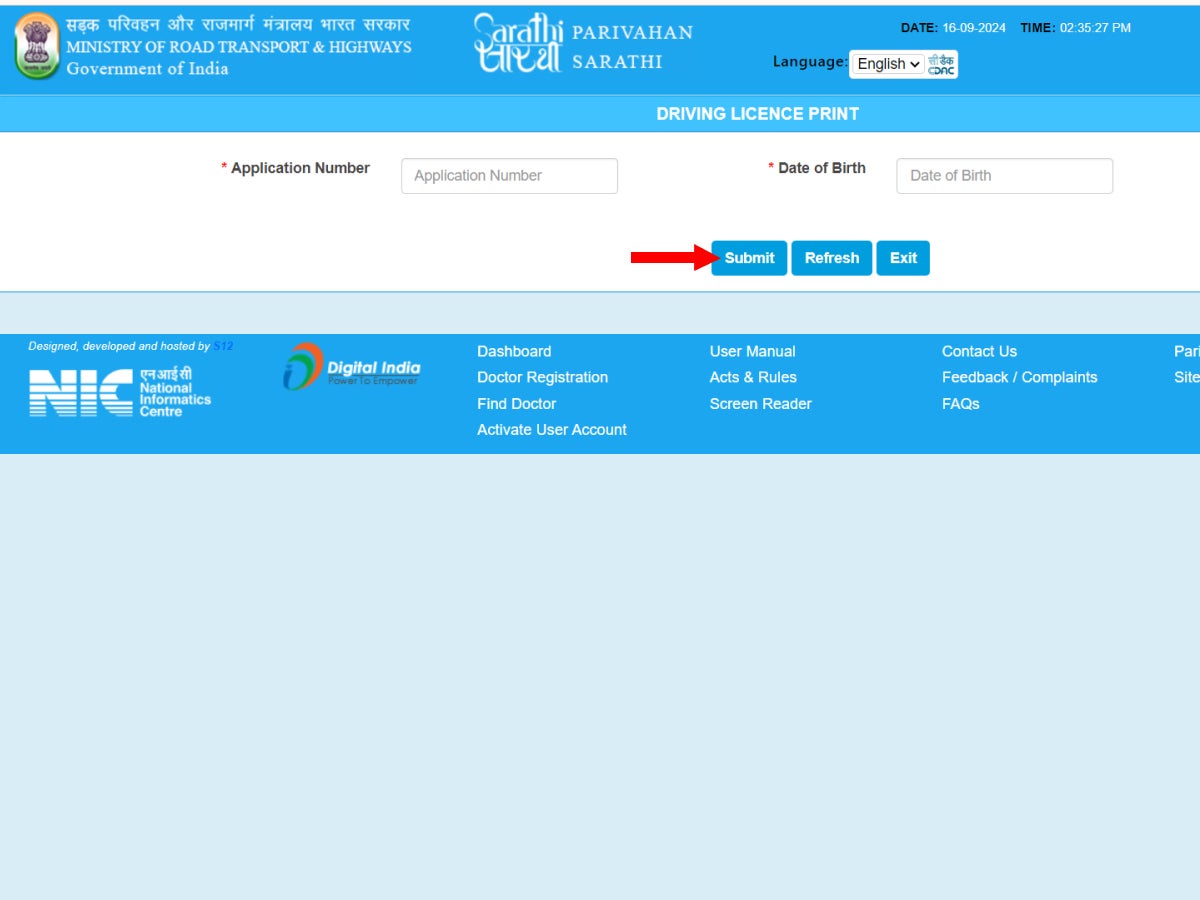
Step 5: On the new page, you will be required to fill in your Application Number and Date of Birth. Once that is done, click on “Submit”.
Step 6: A copy of your driving licence will open on the screen. You can save this as a PDF for further use as your e-driving licence.
Methods to Download Your Driving Licence Online
| Feature / Step | DigiLocker App | UMANG App | Parivahan Website |
|---|---|---|---|
| Platform | Mobile app (Android/iOS) | Mobile app (Android/iOS) | Website (desktop/mobile) |
| Login Method | Mobile number linked with Aadhaar | Mobile number + Aadhaar (via DigiLocker) | No login required |
| Search Keyword | "Driving Licence" under MoRTH | "Driving Licence (MoRTH)" or state-wise DL | Not required |
| Details Required | DL number | DL number | Application number + Date of birth |
| Account Needed | DigiLocker account | DigiLocker account (can be created via UMANG) | None |
| Where to View DL | Issued Documents section | My Documents → Driving Licence | On-screen after submission |
| Download Format | PDF (View & Save) | PDF (Download option available) | PDF (Save or Print) |
| Best For | Quick access with Aadhaar | Unified access to government services | Recent applicants or learners |
Learner Driving Licence Download Process
If you have applied for a learner's licence and want a soft copy, you can do so using the Parivahan website. The procedure for downloading a learner's driving licence remains the same as the procedure for downloading a permanent driving licence. Simply enter your application number and date of birth, and your licence will open on the screen. You can save this in a PDF format, and print it if you wish to keep a hard copy of the learner's licence.
.
How to Use Your Downloaded Driving Licence?
A soft copy obtained after downloading your driving licence holds the same legal value as the smart card DL issued by the RTO. Thus, in essence, a soft copy of your DL is a valid identification proof. It can be used for the following purposes:
- To share with the traffic police when they enquire about your driving licence
- To check in at all airports in India
- To verify your age by various institutions
- To verify your identity when checking into a hotel
- To use as address and age proof when applying for a passport
In essence, an electronic copy of your driving licence can be used to establish your identity, and as proof of age and address when the situation demands.
The Legality of Digital Driving Licences in India
If you’re tired of carrying a bulky wallet, the million-dollar question is whether your smartphone can legally replace your physical driving licence.
The verdict? Yes, it can. But as with most things in law, there is some important fine print you should know.
The Legal Framework: Why It’s Legitimate
You aren't just showing a photo of your ID; you are providing a legally recognised digital document.
- The Motor Vehicles (Amendment) Act, 2019: This legislation officially integrated digital documents into the legal system.
- MoRTH Circular (No. RT-11036/64/2017): The Ministry of Road Transport and Highways explicitly directed authorities to treat documents on DigiLocker and mParivahan as authentic substitutes for physical cards.
In short: If you present your DL via these two specific apps, you are legally compliant.
What the Courts Say
The judiciary has been quite firm about this. In 2022, a Delhi district court famously overturned a fine (challan) issued to a driver who had presented their licence via mParivahan. The court ruled that the officer had no right to penalise the driver, reinforcing that digital versions carry the same weight as the original document.
Dealing with Traffic Stops
While the law is on your side, the officer on the street might not always be up to date. If you encounter an officer who insists on a physical card, here is your game plan:
- Display the QR Code: Open the mParivahan or DigiLocker app and offer the QR code for scanning.
- Mention the MoRTH Directive: Gently remind the officer that the Ministry of Road Transport has authorised digital verification.
Stay Firm but Polite: If a fine is still issued, don’t panic. You have a massive legal advantage if you choose to contest it in court later.
Versatility Beyond Driving
Your digital DL isn't just for avoiding traffic tickets. A PDF download from DigiLocker or a Parivahan extract is now widely accepted for:
- KYC Verification: Opening bank accounts or getting a new SIM card.
- Car Rentals: Most major rental agencies accept digital credentials.
Identity Proof: General verification at airports or hotels.
Pro-Tip: Screenshots or gallery photos of your licence do not count. Stick to the official government apps to stay within the law. Do you currently use DigiLocker for your documents, or are you still holding onto the physical copies just in case?
Digital DL Download: Pro Tips & Common Mistakes to Avoid
Getting your driving licence (DL) into digital form is a game-changer, but the government portals can be a bit finicky. To ensure you don't end up shouting at your screen, follow this streamlined guide to a stress-free download.
- Browser Choice Matters: Avoid older browsers and some mobile browsers. For the smoothest PDF generation, stick to Chrome or Firefox on a desktop.
- The "Double-Cloud" Strategy: Once you’ve secured your download, don't let it sit only in your "Downloads" folder. Upload it to Google Drive or iCloud. Phones can be replaced; your digital records shouldn't have to be.
- Make DigiLocker Your MVP: While a PDF is great, the DigiLocker version is your primary legal tool. It’s verified in real-time, making it the gold standard for bank KYC and official identity checks.
- Rename Your Files: "document_final_v2_6.pdf" is a nightmare to find. Rename it immediately to something logical like DL_FirstName_2026.pdf. Your future self will thank you.
- The "Emergency Backup" Screenshot: Screenshots aren't legally binding on their own, but they are great for quick reference. Snap a picture of your mParivahan DL and tuck it into a "Private" or "Important" folder for offline access.
- The Date of Birth Trap: This is the #1 reason for failed logins. The portal strictly uses the DD/MM/YYYY format. If you try to use the American MM/DD/YYYY style, the system will reject you faster than a car with no fuel.
- The "Ghost" Phone Number: If you’ve changed your mobile number and haven't updated it in the Sarathi database, you won't get the necessary OTP. Ensure your current number is linked before you start the process.
- Don't Pay for "Express" Services: You might see third-party sites offering to "help" you download your DL for a fee. Don't fall for it. Official extracts from parivahan.gov.in are free. There is no "fast lane" that costs money.
LL vs. DL Confusion: Remember that a Learner’s Licence (LL) and a Permanent Driving Licence (DL) live in different neighbourhoods on the Sarathi portal. If you're looking for your LL under "DL Services," you’ll come up empty-handed.
Conclusion
Whether you’ve lost your smart card DL or simply want a soft copy for convenience, downloading your driving licence online is quick and hassle-free. With DigiLocker, UMANG, and the Parivahan website offering secure access, you can store your DL digitally and use it across checkpoints, airports, and institutions. Just remember to keep it safely stored, ideally in an encrypted app or password-protected file. And yes, your digital driving licence is legally valid across India.